
Choosing the right VPN can feel overwhelming with so many options out there. But it doesn’t have to be complicated.
You want a VPN that keeps your data safe, works smoothly, and fits your needs—whether that’s streaming your favorite shows, browsing securely, or protecting your privacy. In this guide, you’ll learn exactly what to look for and how to pick the best VPN for your online life.
By the time you finish reading, you’ll feel confident making a choice that protects your privacy and enhances your internet experience. Keep reading to discover the key factors that really matter when choosing a VPN.
Set Your Vpn Goals
Choosing the right VPN starts with setting clear goals. Different VPNs serve different purposes. Knowing what you want helps find the best fit. Focus on your main needs before picking a service. This section breaks down common VPN goals.
Privacy And Security
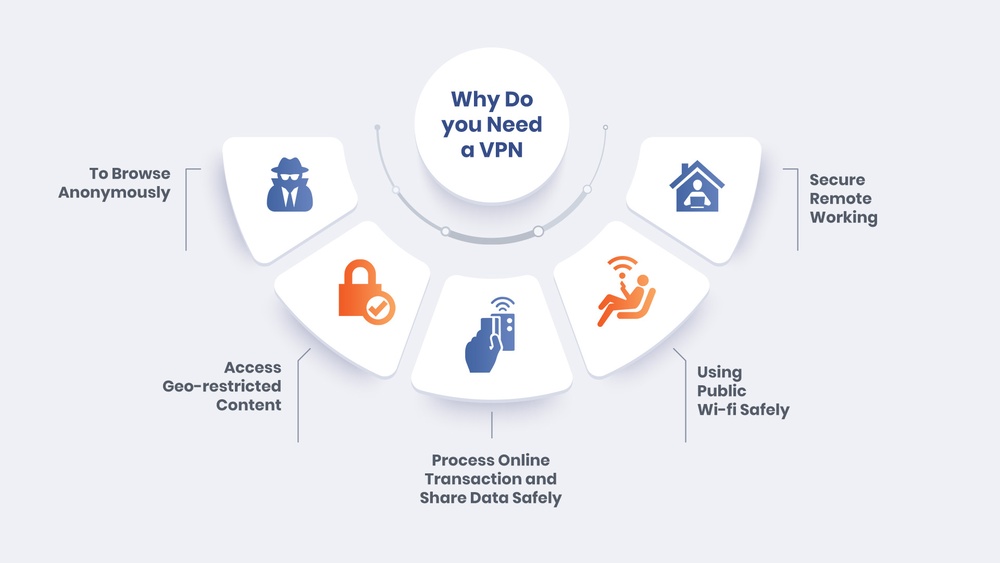
Privacy is the top reason many use a VPN. A good VPN hides your IP address and encrypts your data. It stops hackers, trackers, and even your internet provider from spying. Look for providers with no-logs policies. Independent audits prove their privacy claims. Strong encryption and secure protocols matter most here.
Streaming And Bypassing Geo-blocks
Many use VPNs to watch shows blocked in their country. A VPN can make it look like you are somewhere else. Fast speeds reduce buffering and improve quality. Choose VPNs with many server locations. Compatibility with popular streaming services is key. Some VPNs work better with Netflix, Hulu, or BBC iPlayer.
Torrenting And File Sharing
Torrenting needs special VPN features. Look for services that allow P2P traffic on many servers. Unlimited bandwidth is important for large file downloads. Kill switches protect your identity if the VPN drops. Privacy policies should protect against copyright claims. Security and speed both matter for safe torrenting.
General Browsing And Public Wi-fi
For everyday browsing, a VPN adds a layer of protection. Public Wi-Fi networks are risky without a VPN. It stops hackers from stealing your data on open networks. A lightweight VPN app that runs quietly is best. Look for fast connections to avoid slow page loads. Simple setup and ease of use help daily protection.
Credit: copvpn.com
Check Privacy Features
Checking privacy features is critical when choosing a VPN. It shows how well the service protects your data. Your privacy depends on these features, not just speed or price.
A VPN with strong privacy features keeps your online activity safe. It stops third parties from tracking or storing your information. Below are key privacy aspects to check before picking a VPN.
No-logs Policy
A no-logs policy means the VPN does not keep records of your actions. This protects your identity and browsing history. Choose a VPN that clearly states it does not save logs.
Without logs, there is no data to share with anyone. This keeps your information private and secure. Verify the policy by reading the VPN’s privacy statement carefully.
Independent Audits
Independent audits are checks done by third-party companies. They test if the VPN follows its privacy promises. A VPN that passes audits is more trustworthy.
Look for VPNs that publish audit results. These reports show if the no-logs policy and security measures are real. Independent audits help you avoid unreliable VPN providers.
Jurisdiction And Data Laws
The country where the VPN is based affects your privacy. Some countries have strict data laws; others share data with governments. Pick a VPN located in a privacy-friendly country.
Countries outside of surveillance alliances provide better protection. This reduces the risk of your data being handed over. Knowing jurisdiction helps you understand your VPN’s legal limits.
Compare Vpn Protocols
Comparing VPN protocols helps you find the best balance of speed, security, and reliability. Each protocol has strengths that suit different needs. Knowing these differences guides your VPN choice. Focus on protocols that keep your data safe while providing fast connections.
Wireguard Benefits
WireGuard is a newer VPN protocol. It uses modern cryptography for strong security. It is lightweight, which means faster connection speeds. WireGuard also has a simpler codebase, reducing vulnerabilities. Many users choose it for quick and secure browsing.
Openvpn Reliability
OpenVPN has been around for years. It is highly trusted for secure connections. OpenVPN works well on many devices and platforms. It offers strong encryption and good stability. This protocol is a solid choice for consistent VPN use.
Other Protocol Options
Other protocols include IKEv2 and L2TP/IPsec. IKEv2 is fast and good for mobile devices. L2TP/IPsec is easy to set up but slower. Some VPNs offer proprietary protocols for extra features. Choose based on your device and what you need most.

Credit: us.norton.com
Evaluate Speed And Performance
Evaluating speed and performance is crucial when choosing a VPN. A fast VPN ensures smooth browsing, streaming, and downloading. Poor speed can cause buffering, delays, and frustration. Performance depends on several factors like server locations, connection stability, and bandwidth limits. Understanding these elements helps you pick the right VPN for your needs.
Server Locations And Distance
VPN servers spread across many locations improve speed. Choose a VPN with servers near your physical location. The closer the server, the faster the connection. Faraway servers can slow down your internet. Sometimes, distant servers help access content from other countries. Balance speed with your need to access specific sites or services.
Connection Stability
Stable connections prevent drops and interruptions. A reliable VPN keeps your link steady during use. Look for VPNs known for consistent connections. Frequent disconnects reduce productivity and cause annoyance. Test connection stability with free trials or reviews before deciding.
Bandwidth Limits
Bandwidth limits restrict how much data you can use. Unlimited bandwidth is best for heavy users. Streaming, gaming, and large downloads need high data allowance. Some VPNs impose monthly or daily caps. Check the limits to avoid slowdowns or extra charges. Choose a VPN offering sufficient bandwidth for your activities.
Look For Usability
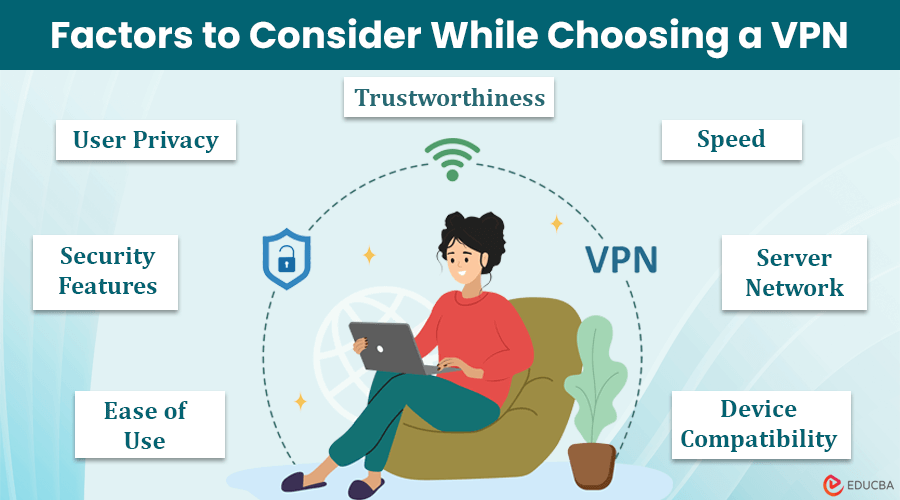
Usability is a key factor when choosing a VPN. A VPN should be easy to use and fit smoothly into your daily routine. Complicated setups or confusing interfaces can make the experience frustrating.
Good usability means you spend less time figuring out how to connect and more time enjoying secure browsing. This section covers important usability features to check before making a choice.
Device Compatibility
Your VPN must work on all devices you own. Many people use smartphones, tablets, and computers. A VPN that supports Windows, Mac, iOS, and Android covers most needs.
Check if the VPN offers apps for your devices. Some VPNs also support routers and smart TVs. The more devices it supports, the better your coverage.
User Interface And Apps
The VPN app should be simple and clean. A clear layout helps you connect with one click. Avoid VPNs with cluttered or hard-to-navigate apps.
Look for apps that show your connection status and server locations clearly. Easy access to settings and customer support is a plus. A well-designed app saves time and reduces stress.
Simultaneous Connections
Simultaneous connections mean using the VPN on multiple devices at once. This feature is useful for families or people with many gadgets.
Find out how many devices a VPN lets you connect at the same time. Some VPNs allow 5 or more connections. More connections mean better value and flexibility.
Credit: www.educba.com
Consider Extra Features
Choosing a VPN involves more than just speed and server count. Extra features can improve your online safety and browsing experience. These features help protect your data and give you more control. Knowing what extras to expect helps you pick the right VPN for your needs.
Kill Switch And Leak Protection
A kill switch stops all internet traffic if the VPN drops. This keeps your real IP address from showing. Leak protection blocks DNS or WebRTC leaks that reveal your location. These features keep your identity safe even if the VPN connection fails.
Split Tunneling
Split tunneling lets you choose which apps use the VPN and which don’t. This saves bandwidth and improves speed for apps that don’t need a VPN. You can access local services while keeping other activities secure. It gives flexibility and better control over your connection.
Ad And Malware Blocking
Some VPNs block ads and harmful websites automatically. This stops annoying ads and protects against malware threats. It creates a safer browsing experience without extra software. This feature keeps your device cleaner and speeds up page loading.
Free Vs. Paid Vpns
Choosing between free and paid VPNs requires careful thought. Each option offers different features and risks. Understanding these differences helps you pick the right service for your needs.
Risks Of Free Vpns
Free VPNs often limit data and speed. They may show ads that interrupt browsing. Some free services log your data and sell it to advertisers. Security features tend to be weaker in free VPNs. Users might experience slower connections due to overcrowded servers. There is also a risk of malware hidden in some free apps. Privacy is not guaranteed with many free VPNs.
Benefits Of Paid Services
Paid VPNs usually offer stronger security and privacy. They do not show ads or sell user data. Speeds are faster because paid servers have fewer users. Many paid options support multiple devices at once. Users get access to more server locations worldwide. Premium features like kill switches and advanced encryption come standard. Customer support is often available to help with issues.
Trial Periods And Money-back Guarantees
Many paid VPNs provide free trials or money-back guarantees. These options let you test the service risk-free. You can check speed, reliability, and ease of use. If the VPN does not meet expectations, you can get a refund. This allows you to explore features before committing long-term. Trial periods vary but usually last from seven to thirty days.
Read Reviews And Reputation
Reading reviews and checking a VPN’s reputation helps you avoid poor services. Genuine feedback shows how the VPN performs in real life. Reputable companies tend to offer better security and support. Digging into user opinions and expert insights gives you a clearer picture.
User Feedback
User feedback reveals everyday experiences with a VPN. Look for comments on speed, reliability, and ease of use. Pay attention to recurring problems like dropped connections or slow speeds. Positive reviews often mention helpful customer service and clear privacy policies. Check multiple sources for balanced opinions.
Expert Analysis
Experts test VPNs with in-depth tools and benchmarks. They assess security features, encryption quality, and data handling. Their reviews highlight strengths and weaknesses you might miss. Experts compare VPNs based on speed, server count, and device compatibility. Trust reviews from well-known tech websites and security blogs.
Transparency And Company History
Transparency shows how open a VPN company is about its policies. Check if the provider publishes audit reports or security updates. A clear no-logs policy is essential to protect your privacy. Research the company’s history for past security issues or legal problems. Reliable companies usually have a long track record and clear ownership details.
Test Before You Commit
Testing a VPN before making a long-term commitment saves time and money. It helps ensure the service meets your needs for speed, security, and ease of use. Many VPN providers offer ways to try their service risk-free. This section explains how to take advantage of those options.
Free Trials
Free trials give full access to a VPN service for a limited time. You can download the app and test all features without paying. It is a good chance to check the user interface and connection reliability. Free trials usually last from one day to a week. Sign up with your email, and avoid sharing payment details if possible. This method lets you explore the VPN without commitment.
Refund Policies
Many VPN providers offer money-back guarantees. These refund policies allow you to use the VPN for a set period, often 30 days. If you are unhappy, simply request a refund. Check the terms carefully to know what qualifies. Some providers require you to contact support or fill out a form. A clear refund policy gives peace of mind before paying.
Speed And Security Testing
Test the VPN’s speed by running internet speed tests with and without the VPN active. Choose servers close to your location for better results. Security can be checked with online tools that detect IP or DNS leaks. Ensure the VPN hides your real IP address and keeps data encrypted. Testing these aspects helps confirm the VPN’s performance and privacy protection.
Frequently Asked Questions
How Do I Know Which Vpn To Choose?
Choose a VPN based on your main needs: privacy, speed, device limits, and server locations. Prioritize no-log policies and strong encryption. Select modern protocols like WireGuard. Consider user-friendly features and budget. Test trial versions to find what fits your internet use best.
Does Aura Have A Vpn?
Aura does not offer a standalone VPN service. It focuses on identity theft protection and digital security instead.
Can I Use A Vpn With Zscaler?
Yes, you can use a VPN with Zscaler, but some VPNs may conflict with its security policies. Choose compatible VPNs for smooth access.
What Vpn Works With Spectrum?
NordVPN, Surfshark, ProtonVPN, and IPVanish work well with Spectrum. They offer fast speeds, strong privacy, and reliable connections. Choose based on your needs like streaming, security, or affordability.
Conclusion
Choosing the right VPN depends on your personal needs and priorities. Focus on privacy features like a no-logs policy and strong encryption. Consider the speed and reliability for streaming or downloading. Check if the VPN supports your devices and offers good customer support.
Remember, a simple, secure VPN can improve your online safety. Take your time and pick a VPN that fits your daily internet use. Stay safe and enjoy a better online experience.
